The average organization now sends roughly 18,000 AI prompts a month. Place your enforcement point in the wrong layer and most of that traffic never crosses it.
This debate isn’t new and many companies have flocked to lighter browser-based solutions. But with AI, the answer of what’s right for your org may be different.
As you’d expect, the farther the enforcement point sits from the user, the more surfaces it covers and the less it understands about any single interaction. The closer it sits, the richer the context and the fewer surfaces it sees. In this article, we’ll review the four architectures to help you determine which is the best for your org’s needs regarding AI usage security.
Where Can AI Security Enforcement Live? The Four Architectures
AI security enforcement can live in four places: on the network path (an inline gateway or SSE proxy), on the device (an endpoint agent), in the browser (an enterprise browser or extension), or in the cloud (API integrations with sanctioned SaaS). Every product in the category is one (or a few) of the four, whatever the branding says.
Every architecture therefore gets scored against five AI surfaces:
- Desktop AI apps eg ChatGPT and Claude desktop, Windows Copilot, IDE assistants, local LLMs.
- Browser AI eg web chat interfaces, corporate and personal accounts alike.
- Mobile AI eg ChatGPT and Claude apps on personal phones.
- SaaS-embedded AI eg Copilot in M365, Agentforce in Salesforce.
- Agentic and MCP traffic eg agents calling models and tools over APIs and MCP, the Model Context Protocol; no human interface.
You cannot score surfaces you have not mapped; detection comes first.
Network Enforcement: Inspection at the Point of Transit
Network enforcement inspects AI traffic inline where it crosses a gateway, proxy, or SSE cloud edge, and blocks before data leaves the organization. That is inline AI inspection: policy enforced while the connection is still open.
Where it wins:
- It sees every interface. Application- and device-agnostic on the paths it sees: browser, desktop, scripts, and API and MCP calls all cross the network, from managed and unmanaged devices alike.
- Performance. Without code to manage across devices and extensions, the risk of downtime or complaints is far lower. As is dealing with issues or bugs.
- Easy installation and maintenance. This depends on the product, but for the most part, network enforcement doesn’t require much setup or ongoing maintenance.
Where it loses:
- The off-network gap. Remote traffic that never touches the corporate path is invisible; SSE closes the gap only by putting a client on every device, converting "no agent needed" into "agent needed" for remote workers.
- Potential latency. If inspection isn’t local, this backhauls every request to a vendor PoP (point of presence). For example, Netskope's SLA caps proxy processing at 50ms per request, and even at that ceiling users feel it; slowdown complaints fill Gartner Peer Insights.
Best for: the broadest traffic-type coverage of the four, agents and MCP included, if traffic stays on managed paths or remote devices carry the SSE client.
Endpoint Enforcement: Inspection at the Point of Use
The endpoint answer to certificate pinning is to stand on the near side of encryption: an agent on the device sees content before TLS wraps it, and rides along wherever the device goes.
Where it wins:
- Visibility and controls. Endpoint agents let you see just about everything and have a pre-encryption vantage where pinning is irrelevant.
- Remote work. If your workforce is heavy on remote work, agents ensure they are secure wherever they work from.
Where it breaks:
- Managed desktops only. BYOD, contractor, and partner machines are invisible.
- Limited agentic coverage. Agents running outside of the desktop cannot be seen by endpoint agents, nor can they sense most connectors and integrations.
- Outage risk. If the July 2024 CrowdStrike Falcon update that took down most airports and airlines taught us anything, it’s that endpoint agents can cause major outages. The cost of your machines being out for a day or two is a major risk for important workloads.
- Performance lags and complaints. The documented slowdowns and software conflicts are endless with macOS and Linux support lagging Windows. This can cause significant performance issues for your entire workforce and thus create a lot of tickets for your team.
- Event visibility is not data visibility. Most endpoint telemetry records that an AI process ran, not the prompt text; content requires full endpoint DLP inspection.
Best for: remote workers and managed fleets on Windows.
Browser Enforcement: Inspection at the Point of Entry
Browser enforcement inspects AI interactions where prompts are typed, inside the established TLS session, through a managed enterprise browser or an extension in the user's existing browser. Browser enforcement was the initial popular selection, as it’s lightweight while still capturing all browser-based AI usage. But as AI expands well beyond the browser, it’s like putting a band-aid on an open gushing wound.
Where it wins:
- Browser visibility Sees the prompt at the point of entry: typed text, pastes, uploads, personal accounts included.
- Easy and familiar. Extensions deploy in weeks into the existing Chrome fleet, no migration required.
- Remote work. It works regardless of where your employees are.
Where it breaks:
- Only covers the browser. This is the key issue that really eliminates browser enforcement as a standalone option. Desktop apps, IDE assistants, autonomous agents, and API and MCP traffic never pass through it, and that non-browser share is where the bulk of AI usage is going.
- Extensions are evadable and fragile: removable on unmanaged devices, sidestepped by a different browser, an attack surface themselves (CSA research note), constrained by Manifest V3.
Best for: contractors, maybe. But not really a standalone solution if your org is using AI in any serious way.
Cloud and API Enforcement: Inspection Inside Sanctioned Apps
The fourth architecture never touches a device or a packet. It connects to sanctioned SaaS tenants through their APIs and scans AI activity and data exposure inside the applications the organization already controls.
Where it wins:
- Performance. no device footprint, no traffic steering, coverage of any device that touches a sanctioned tenant, BYOD included; deployment runs in days.
- Microsoft-only or Salesforce-heavy users. Copilot Studio, Agentforce, and data-at-rest exposure are API and posture problems, not traffic problems.
- Often already licensed. E5 Purview entitlements (Microsoft's top tier) include it, so marginal cost sits near zero for M365-heavy shops.
Where it breaks:
- Out-of-band means after-the-fact: Forcepoint states API-based CASBs "always perform scans in retrospect." Detection, not prevention.
- Sanctioned apps only. It only works for a very tiny fraction of apps.
Best for: Microsoft or Salesforce heavy users, but even then, not as a standalone solution.
The real decision: endpoint v. network
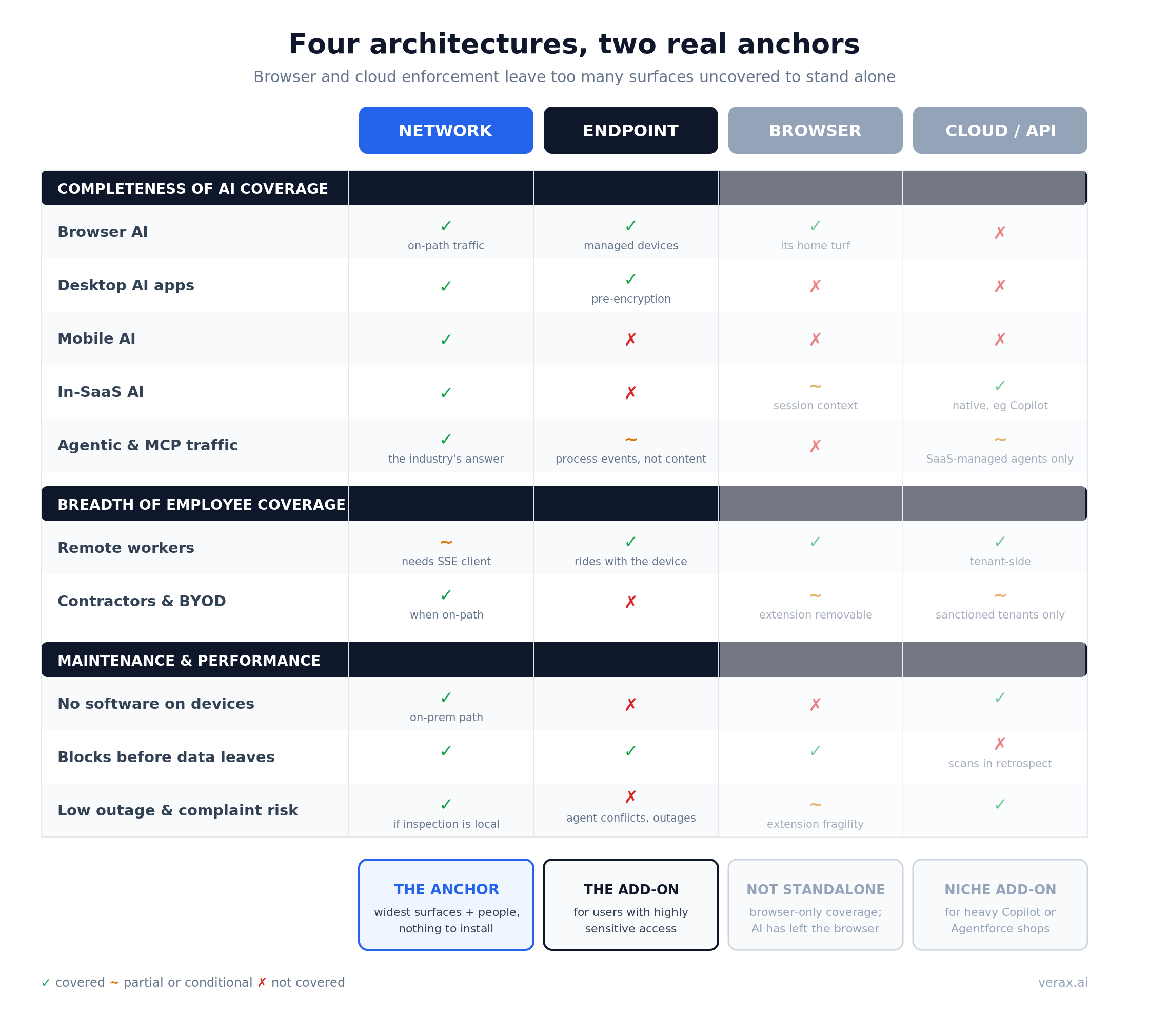
No architecture covers all five surfaces; the question is which you anchor on, and what you accept or add for the rest.
That said, browser enforcement and API-based CASBs are far too limited on their scope of coverage to be a real standalone solution. They can be helpful as additional coverage, especially API-based solutions for Microsoft or Salesforce heavy users. But with most AI usage happening outside of the browser, neither should be your only answer.
That leaves us with endpoint agents and network enforcement.
Completeness of AI coverage
Between the two finalists, network takes the wider sweep of the five surfaces. Browser AI, desktop traffic, scripts, and agent and MCP calls all cross the network, from managed and unmanaged devices alike. Endpoint agents offer deeper inspection on the desktop across all of its interfaces, reading content that pinning may hide from the proxy and covering users wherever the laptop goes. The trade is scope: an agent sees one device class deeply and almost nothing beyond it. Mobile and SaaS-embedded AI are out of reach, and agents running outside the desktop are invisible to it.
Winner: Network
Breadth of employee coverage
Surface coverage means nothing if the control misses the people, and the two finalists miss opposite sets. Network covers everyone whose traffic touches the corporate path, contractors, partners, and BYOD included, and goes blind off-network unless remote devices carry the SSE client. Endpoint coverage is the inverse: the agent rides along wherever the managed device goes, and stops dead at the managed fleet's edge. Run the arithmetic on a real workforce: an endpoint-only deployment at a 12,000-person organization with 2,400 contractors leaves every contractor machine invisible by definition. A fifth of the people are gone before the first policy fires. If your risk concentrates in a remote, fully managed fleet, endpoint earns its keep; if it spreads across contractors, partners, and personal devices, the network sees people no agent will ever be installed for. Run this math on your own mix.
Winner: Endpoint agent for heavily remote teams. Otherwise, push.
Ease of maintenance and performance
This criterion is the least symmetrical of the three. Network enforcement puts no code on devices: nothing to package, test against OS updates, or reconcile with the other agents already fighting over the kernel. Its real maintenance question is latency, and that is a locality question: inspection backhauled to a vendor PoP is latency users feel, while local inline inspection is not. Endpoint agents carry the ongoing bill: lifecycle management, macOS and Linux lag, documented software conflicts, and the outage tail risk the July 2024 CrowdStrike update made vivid, all of it landing on your helpdesk queue. Neither is free. One is code you run on every laptop forever; the other is a path you steer once and tune.
Winner: Network.
Why the right answer is network (potentially alongside endpoint agents)
Weigh the three criteria together and the anchor picks itself. Network enforcement is the only layer that sees all five surfaces to a useful depth, the only one whose coverage extends past the managed fleet to contractors and personal devices, the only one the industry itself has chosen as the answer for agent and MCP traffic, and the only one that adds no software, no performance tax, and no CrowdStrike-shaped tail risk to your fleet. Our answer, stated plainly: anchor on the network.
One condition makes that anchor materially stronger: keep the inspection local. A security tool that ships every prompt to its own cloud has quietly created the next problem it will be paid to solve, a concentrated store of your most sensitive data sitting in someone else's environment. Local, on-network inspection enforces the policy without manufacturing that new exposure, and without the metered per-prompt pricing that vendor-cloud processing carries. [LINK PLACEHOLDER: "The Hidden Costs of AI Security"]
Then add depth only where the risk demands it, not everywhere:
- Endpoint agents for highly sensitive access. The engineers who touch model weights, the finance team closing the quarter, the admins with production credentials: for users whose desktops handle data you cannot afford in any prompt, pre-encryption content inspection is worth an agent. Deploy it to that population, not the whole fleet, and the maintenance bill stays proportional to the risk.
- API connectors for heavy Copilot or Agentforce shops. SaaS-embedded AI is a posture problem, not a traffic problem. If M365 Copilot or Agentforce sits at the center of how your company works, add the API layer for it; E5 shops often already own the license.
Browser tools are the one layer we would not anchor on or reach for first. They watch the front door of a building that grew three new entrances this year.
If you take one question into your next vendor meeting, make it this one: which of the five surfaces do you inspect, for which of my people, and where does my prompt content go when you inspect it? The architecture behind the answer matters more than anything on the slide.